J'ai essayé de payer pour l'ordre et la connexion a été perdue entre PayPal et votre serveur. Que puis-je faire?
If for some reasons, the connection between PayPal and our server was lost, and payment was not submitted, you can send PayPal manually.
You do not have to place a new order. Please check your email for order details and payment instructions.
Log in to your PayPal account at www.paypal.com and click 'Send Money' in Tools menu:
You do not have to place a new order. Please check your email for order details and payment instructions.
Log in to your PayPal account at www.paypal.com and click 'Send Money' in Tools menu:

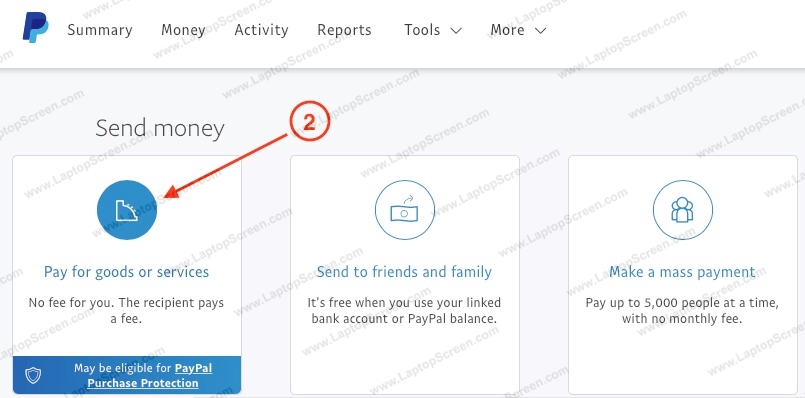
On the next page, click "Pay for goods or services".
On the next page, add our PayPal email address (paypal@laptopscreen.com) and click 'Next' button:

On the next page:
- select currency for "Recipient gets" as in your order. Currently, we accept only USD, CAD, GBP, EUR.
- select amount as in your order.
- add your order number in the note;
- click "Continue" button.
IMPORTANT: Order status will be changed automatically to "Paid now can ship" if currency and amount matches.
- select currency for "Recipient gets" as in your order. Currently, we accept only USD, CAD, GBP, EUR.
- select amount as in your order.
- add your order number in the note;
- click "Continue" button.
IMPORTANT: Order status will be changed automatically to "Paid now can ship" if currency and amount matches.
