LCD screen

Many of our repeat customers at LaptopScreen.com are professional repair businesses who rely on our services to provide laptop screen repair for their clients. A few years back we’ve given these wonderful technicians and owners a way to list their businesses on our website.

The Installer Directory has been a tremendous success with many businesses listing themselves on our site. All of the listings have been vetted by us manually and most of the listed storefronts are our repeat purchasers of all sorts of LCD screens.

Customers on our site are encouraged to contact a local repairer who can assist in selecting the correct LCD replacement and perform the repair in a professional setting.

Professionals and business owners are invited to join our installer directory by applying with their account here.

As well we have launched our own mail-in laptop display repair service – www.ScreenFix.com

ScreenFix offers easy laptop display repair quoting and secure on-line payment. With live inventory customers can quickly find their laptop model, select the appropriate LCD specification to fix their laptop’s cracked screen and pack and ship their laptop for mail-in repair. Local drop off is available for customers located in the Vancouver, British Columbia area.

Repairs are performed by our technicians with over 16 years of experience in the specific art and science of laptop display repair and replacement. Many of our repairs regularly appear on our YouTube Channel that was started in 2010!

All LCD screen repairs come with our amazing device-lifetime warranty and a 30 day labour warranty. We encourage our readers to visit and bookmark our in-house laptop screen repair service:

working LCD replacement

Here at LaptopScreen.com we have a simple philosophy when it comes to the LCD replacement:
You need a working screen, and we are here to deliver it.

Our clients range from professional techs repairing dozens of computer screens per day to stay at home moms doing their first repair to grandparents who replace their grandchildren screens as Christmas gifts. With such a wide range of clientele we found ourselves facing a unique challenge.

We found that what most people care about is getting their laptop back to working order.

Certainly there are people who know the ins and outs of the LCD technology, the supporting hardware, the electronics standards, the intricacies and the quirks; however there is an equal if not larger amount of people who are simply in distress – their work, studies, digital life is covered in cracks; and splotches of black ink are marring what used to be their window to the world.

Just several years ago, LCD replacement was a highly contested topic, with manufacturers charging exorbitant prices for broken screen repairs, often at half or more of the actual cost of the brand new laptop. In more recent years, the clout surrounding LCD replacement was dispersed, not with-out our help, via hundreds of video tutorials posted to YouTube, showing real people, replacing their broken screens, with a help of a screwdriver and some ingenuity. These developments empowered thousands of people to get back to work on their own.

We realize that our customers are real people who by the flow of the circumstances ended up with a  cracked screen, and at this moment their top priority is to get it fixed. We did our research, found suppliers, built relationships with them, we created technical knowledge base, trained specialists in the field, then we created a comprehensive site, with hundreds of pages of articles describing in the smallest detail everything there is to know about LCD screen replacement. We went further and created dozens of professionally made video tutorials; and once the topic took off, we got our customers to show their own LCD replacement experiences. We did all this to make LCD replacement as easy as possible.

But lets be honest, electronics is a touchy subject on it’s own, and a scourge of phantom issues was unknowingly bestowed upon engineers, technicians and regular folk at the moment when Thomas Edison turned on his first light-bulb. So when it comes to dealing with LCD technology, computers, myriad of parts and methods, inevitably things do not always work “straight-out-of-the-box”.

We decided early on to take care of our customers, and provide a solid promise, the one that will ensure that our customers can feel confident replacing their LCD screen. That is how our guarantee of a working replacement came to life. It’s a promise of ours to take care of your mishap, to ensure that we will do everything possible to get your computer to light up with no cracks or splotches, to get you back to work, school, remote friends and family.

We guarantee a working replacement, or your money back!

DeadPixelsV2

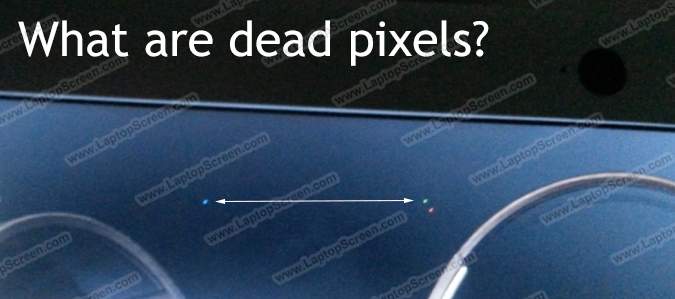
Dead pixels are defects of LCD production. These can be caused by misalignment, improper cuts or dust particles landing on the LCD matrix during production. Generally LCD panels that leave the factory for installation in laptops or for parts resale have been inspected for dead pixels. Over the years the quality control standards for LCDs have improved a lot, and as technology became more affordable, factories began to dispose of the more obvious defects that would have been shipped to customers just a few years earlier. Still, most LCD manufacturers and laptop vendors allow some amount of pixel defects to exist without it giving a rise to a warranty claim.

Pixel defects can be divided into three sub-categories: Dark pixel, Bright Pixel, or a Dark/Bright Sub Pixel. Each pixel on a typical LCD panel is made up of three sub-pixels: Red, Green and Blue. Pixel defects can happen to an entire pixel (all three sub-pixels affected), or can only affect one or two colors in the sub-pixel.

So what can be wrong with a pixel?
Due a defect a pixel may not “turn on” – meaning it does not pass the light from the backlight, and will remain dark, these are called Dark Pixels. A pixel also may not turn off – meaning the pixel will stay transparent and the light from the backlight will shine through continuously, these are called Bright Dots.
The same can happen to an individual sub-pixel by itself to make for a partial pixel defect. These are not as noticeable because sub-pixels are three times smaller, but if they remain bright, they can still be quite visible and annoying.

What can be done about dead pixels?
Typically dead pixels cannot be fixed, however any “dead” pixel can be a “stuck pixel” that is experiencing problems intermittently. Stuck pixels can appear due to shock, pressure or long periods of electrical inactivity, but unlike dead pixels, stuck pixels are not permanently dead, and can be revived by:
– Running imaging software that circulates color patterns on your screen for a duration of time, which may help nudge the stuck pixels into normal operation.
– Sometimes stuck pixels can be gently massaged into operation, this typically affects Dark dots best – since they are off due to a lack of electrical contact.
– Some methods include applying heat to the LCD surface, we have never seen this method work for us, and we don’t recommend it since it can cause further damage to working pixels near-by.

What does LaptopScreen.com do about dead pixels?
LCD Manufacturers and laptop Vendors maintain pixel policy that allows for a certain number of defects for them to “close their eyes” on the problem and claim it to be fully functional. A typical dead pixel policy allows them up to four Dark Dots in conjunction with no more than two Bright Dots for the LCD panel to be considered defect-free.

Unlike laptop vendors, LaptopScreen.com will exchange any screen if the customer is unhappy with the image of the panel they have received from us. Simply contact our Support Department if needed.

Please note, due to continual improvement of LCD manufacturing process, rising affordability of the technology and because of LaptopScreen.com’s unrelenting negotiations with suppliers, dead pixels are almost extinct. Chance of finding a dead pixel on our screen is very low.

PastedGraphic-2 copy

With the advent of newer technologies and smaller components, now it is more important than ever to be mindful of your “technician bed-side manner”, whether you are a one time repairer or a weathered pro.

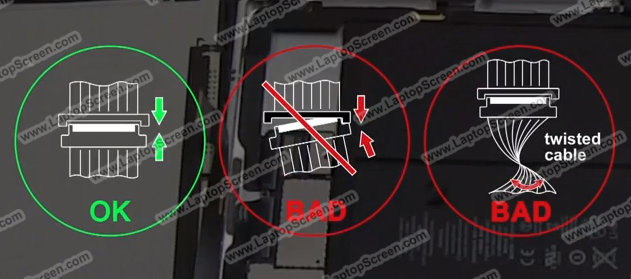
In our experience, the LCD data cable can be a source of additional headaches, which are easily escaped by following proper reconnection techniques. Although this topic spans all connectors one may disconnect on any electronics device, the “biggest offenders” are by far the new style LED 40 pin and smaller type data connectors. Most newer LED screens use a standard 40 pin connector and some screens come with even smaller proprietary sockets all of which are tiny, fragile and sometimes confusing.

The main condition to be aware of when dealing with LED data connectors is that nowadays most of them supply power to the backlight directly through the data connector. Pins 37-40 of a standard 40 pin connector are typically reserved to supply 32 volts at 1.5 amps of power to get the array of Light Emitting Diodes to light up the screen. That is a substantial amount of power which will  cause irreversible damage to components that are not meant for that load, of which there are plenty in a mobile computer.

We always recommend to disconnect the AC power and to remove the battery when conducting a screen replacement. However disconnecting power sources is not always possible due to manufacturer’s limitations. And even when all sources of power are disengaged, the capacitors in the power supply circuits can still hold residual power, which in unfortunate circumstances can get offloaded onto an unsuspecting low voltage circuit, causing it to give up in a puff of blue smoke.

So, whenever disconnecting or reconnecting any connection in a laptop, especially the LCD data cable, make sure it is aligned straight with it’s socket. Slanting the connector in either direction can cause power pins to make contact with data pins, and only a tenth of a second later a fuse or the entire circuit can burn out. Replacing individual fuses for laptop’s intricate circuit is possible, while replacing an individual circuit on a motherboard is not; do not repy on fuses, use caution and patience instead.

Likewise, connecting the data cable in reverse will definitely make power pins align with contacts that were never meant for such input, and as a result may cause damage to the fuse or irreversible damage to the circuitry.

To summarize: in order to avoid damage during your repair, be patient, cautious as well be prepared to examine, study, investigate, before you break, rip or disconnect. Be super careful when touching cables and connectors; and before repair seek instructions in form of videos or manufacturer manuals, and obviously reading our articles and posts is a good step also!

There are a few ways of ordering an LCD screen: using the laptop model number, the screen model, the manufacturer’s part number, and [not recommended] by following an advice found online on a forum, or elsewhere.

Just as everywhere else, there are good ways and bad ways.

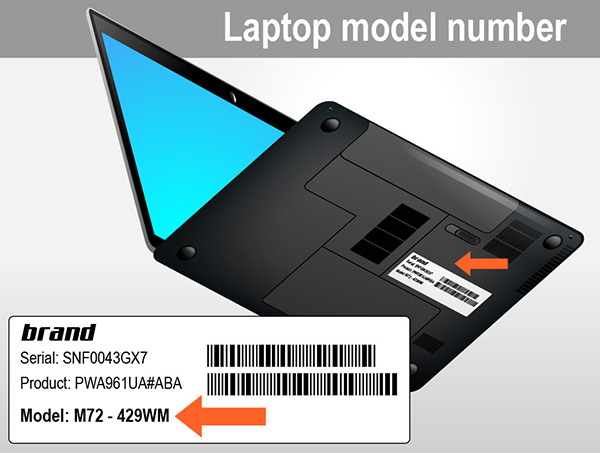
1. Ordering by the laptop model number.

Pic_1

Most of the time, knowing the laptop model is enough to order the right part. However, some laptop manufacturers produce laptop models that have an option for a higher resolution, or in some cases, even a slightly different size screens – Dell Latitude E5540, or most if not all HP’s CTO (Custom-To-Order) laptops, for example.

Whenever you see an option for a different resolution or a different backlight type screen, it is always a good idea to check the LCD screen model number. The higher/lower resolution screen may not (and most likely will not) work properly, and may even damage your computer if you use a different resolution screen other than your original.

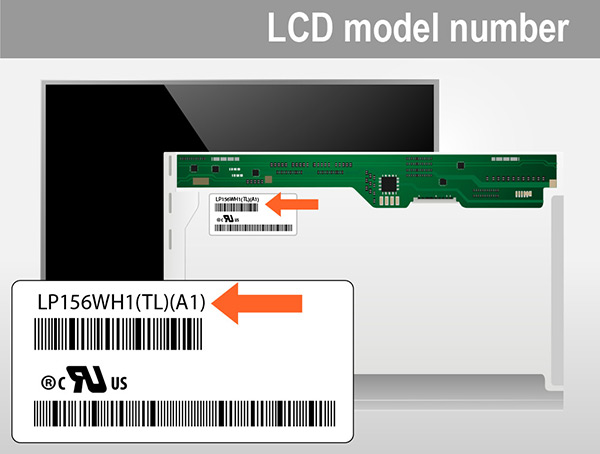
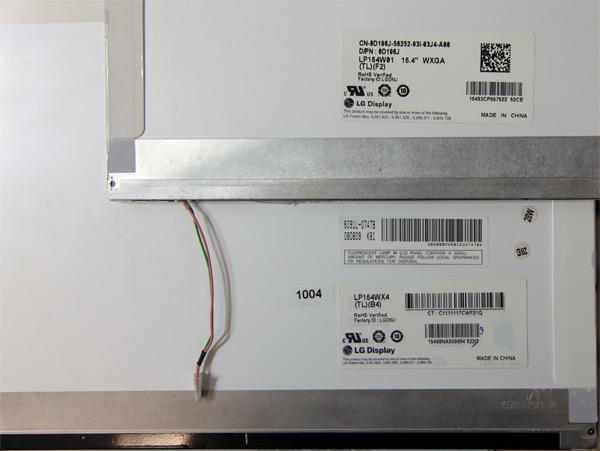
2. Ordering by the laptop screen (LCD) model number.

Pic_2

Every screen installed in any laptop has a screen model number on the back of the LCD screen. This is without a doubt the best way to order replacement screens. The model number denotes the size, the resolution and the backlight type. The only thing you may need to confirm is the location of the connector (for some 15.6″ and 17.3″ HP laptops), and the mounting tabs positioning for some smaller 10.1″ and 11.6″ netbooks.

3. Ordering by the manufacturer’s part number.

Pic_3

This is very similar to ordering by the laptop model number. The part number is commonly found in the owners manual, or by checking online by typing the product or the serial number on the manufacturer’s website. Some of our customers have reported that they were able to get the part numbers from the manufacturer.

But if your laptop screen was replaced or upgraded before, the part number on the LCD screen will not be accurate. In addition to that, we have witnessed cases when our customers have reported they have received wrong information about their machines when contacting the manufacturer; especially in cases when the laptop has more than one screen resolution or backlight type option.

4. Ordering by the information found online.

Pic_4

There are a lot of success stories when our customers were able to get the screen resolution upgraded by just swapping screens; but you have to understand that in order for the LCD screen resolution to be upgraded successfully, more often than not, you need to get a higher capacity cable (a dual-channel vs. a single-channel cable; not always relevant to the amount of pins on the cable); and make sure that the video card will be able to handle the higher resolution. For known working upgrades we provide an Upgrades Options button below a listing.

Whenever you are not sure what screen to order, please create a support ticket. If you create a ticket within our normal business hours, you should receive a response within a matter of minutes. A full laptop model number or an LCD screen model number is required to determine the correct part for you.

LCD models

Truth is, during the production run laptop manufacturers can use more that a few different LCD models for any single laptop model, the screens can even be from different manufacturers. Additionally with time some LCD panels become no longer available and will never become available. So the gist of the matter is in what is available today for a laptop that was made 1, 2, 5 or more years ago.

In today’s world you can show up at an electronics supermarket and take a look at a certain model camera or TV and by the time you come back a week later, that model will be replaced by a different, newer and better device. It’s utmost inconvenient and confusing. In the field of laptop LCD technology  dozens if not hundreds of new models are born every day.

To further exacerbate the problem, each specific model can be produced only in one swift run, never to be repeated again, and the chances of getting the same one in brand new condition even a month later, for some models, are nearly zero.

This definitely poses a problem for a person wishing to replace their screen on an older computer:
if the original model is not available, user is forced to seek alternatives, do massive research, take risks, and generally feel even more lost.

Here at LaptopScreen.com we’ve made it our business to know which LCD screens work with which laptops. When a model of LCD is no longer available from our top level suppliers, we make all efforts to contact lower level suppliers and purchase all of their dwindling stock of the discontinued panel. When even that avenue is no longer available, LaptopScreen.com conducts testing in it’s own facilities, with each specific laptop, to see if the newer panels of identical standard will work, then a mark in the database is made, and the newer panels are released for sale.

Another important principle of LaptopScreen.com to mention is that we don’t focus primarily on the markups or finding quick ways to make a buck; the fact is, most LCD panels are priced remarkably close together, and brands such as Samsung and LG are of comparable supply price to the lesser known ones like ChiMei or AU Optronics; so when the price is not a big concern, the next logical pursuit is the quality. We prefer to sell the best of the bunch, and prioritize our preference to brightness, color gamut and viewing angles.

Therefore, when seeing a different model LCD or even manufacturer, customer can verify the size, mounting points and connector positions, and proceed with the installation. Please follow our tutorials closely and take your time if doing the repair for the first time.

Replacing Laptop Screens is easier than ever.

There is a lot that can be said about fixing a display an a typical laptop in 2024. It is still easy to replace a cracked laptop screen, and its even easier on some of the newest laptops. With thinner bezels, lots of pliable adhesive, and the lack of screws, some LCDs are replaced with just a plastic pick as the only tool.

The past few years saw a resurgence of laptop use with work from home and school work requiring mobility and portability, with full sized keyboards and large screens. With such use cases, occasional display damage is inevitable as LCD screens continue to be fragile. Some of the most common ways the laptop displays can become cracked are via physical damage when traveling, followed by objects such as earbuds, pens and pencils being left on the keyboard when a laptop is closed.

LCD screen is a device that is built around two planes of glass thinner than 1 millimeter, fused along the perimeter to form a matrix of pixels with liquid crystals solution sandwiched in between. The liquid crystals act as a light shutter and remain opaque and closed when not electrified, only becoming transparent when power is applied. The light is provided by the LED back-lighting structure, consisting of a strip of LEDs and light-guides collecting the light and redirecting it onto the pixel matrix. When power is applied to a pixel, the liquid crystals reorient themselves to become transparent which results in pixel becoming bright. The light is then passed through a color filter and shown to the user.

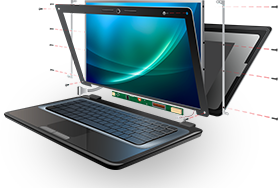
A cracked LCD screen cannot be repaired, just like a broken glass window it needs to be replaced. Majority of run of the mill laptops that can be found in Best Buy, Micro Center, Walmart continue to use standard LCD modules that are self-contained – meaning the whole device is on a single module, including the pixel matrix, the backlight and the circuitry needed to drive it. Most laptop screens feature only a single connector and swapping an LCD can be a matter of 15 minutes.

We guarantee a working replacement LCD or your money back! Our company has been offering affordable and reliable LCD replacement for laptops for over 15 years. Your purchase is protected by our device-lifetime warranty that covers the new LCD you receive from us against any possible manufacturer defects for as long as it is installed in the device it was bought for. With easy 45 day returns and no-cost replacement guarantee, we are invested in providing you with a replacement laptop screen that you will use and keep for a long time.

digitizer_lcd_screen_3

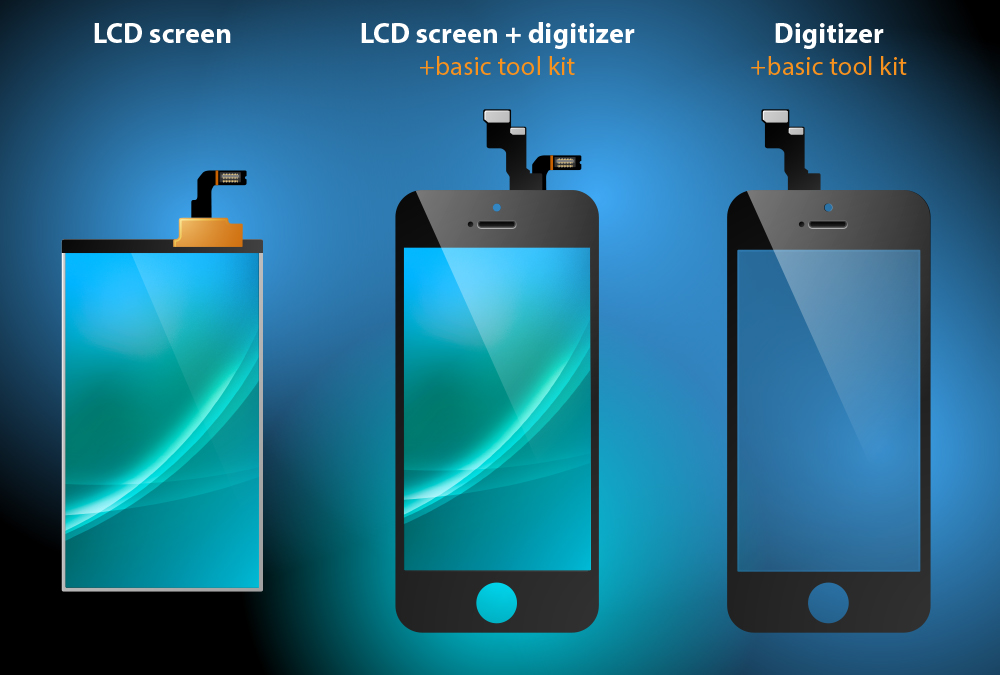
Currently, we stock LCD screens, LCD+Digitizer assemblies and Digitizers (aka touchscreens).

With the purchase of an LCD screen, you will receive a bare LCD panel. Hinges, LVDS cable, webcam, bezel, touchscreen, screen protector or any other case parts will not be included.

With the purchase of an LCD screen+digitizer, you will receive an LCD with the touchscreen attached. Hinges, LVDS cable, webcam, bezel or any other case parts will not be included. The adhesive strips are not a part of the screen, and they will need to be obtained separately. Basic toolkit is included with the purchase of any LCD+digitizer assembly, or with the purchase of any touchscreen.

With the purchase of a touchscreen (aka digitizer), you will receive a bare touchscreen. Hinges, LVDS cable, webcam, bezel, LCD screen or any other case parts will not be included. Basic toolkit is included with the purchase of any LCD+digitizer assembly, or with the purchase of any touchscreen.

When you receive the screen, make sure to inspect it for any damage. Parts damaged in shipping must be reported within 5 days from the date of the receipt, to avoid the receiver being liable for the damage.

Laptop’s built-in web camera is a separate device from the display, it is never a part of the LCD screen and is not included. You can reuse your old camera with your new screen.

Sometimes, the new screen may have an additional screen protector applied directly to the surface of the screen. It is very typical for this kind of screen to appear to be scratched and used, however, in the vast majority of cases only the screen protector is damaged, and, upon removal of it, the screen will look brand new.

At the moment we sell not just LCD’s, but some LCD-related products like cables, connectors, digitizers, frames, mid-frames, buttons, cleaning supplies etc. Such products are of a great quality approved by us, but are not OEM products. We make no representation that these products were made by any specific OEM manufacturer and don’t guarantee authenticity.

hands_no_qm_1_small_1A touchscreen is an electronic input device that the user can control with single or multi-touch gestures. The touchscreen enables the user to interact directly with what is being displayed, rather than using a mouse, touchpad, or any other intermediate device.

Some touchscreens can be controlled by fingers; others may require the use of gloves with a particular type of coating, or the use of a special stylus pen.

The touchscreen prototype was developed in 1977 by Ben Stumpe, a Danish electronics engineer. Multi-touch technology development began in 1982, when the University of Toronto’s Input Research Group introduced the first human-input multi-touch system. It was using a glass panel with a camera placed behind the glass. Later, in 1985, the University of Toronto group including Bill Buxton developed a multi-touch tablet that used capacitance rather than bulky camera-based optical sensing systems.

Nowadays, touchscreen devices have established themselves as an industry standard for most smartphones, tablets and a large fraction of laptops. Most households will have at least one device with a touchscreen, and our customers are no exception.

As a result of the wide popularity, these screens brake on an occasion. What many users fail to take into the consideration, is that the touchscreen and the actual LCD screen are two independent parts.

So:

Touchscreen (AKA digitizer) is the thin transparent layer of plastic, which reads the signal from the touch and transports it to the processing unit. It is the part that you can touch without disassembling the device.

LCD screen is the panel that is inside the device, which displays the image. You can not get to the LCD without taking the device apart first.

When only the touch screen is broken, you should still see what is happening on the screen, and the screen should still function as normal.

When only the LCD is broken, you can still use the touchscreen, but the panel will have dark blobs or spiderweb-looking cracks (or both).

When both LCD and touchscreen are damaged, you may still be able to use portions of the touchscreen, and some parts of the LCD may display the image, but you will incur obvious difficulties in using the device as normal.